flutter路径的用法(下)
本节目标:
了解路径的各种操作和测量方法,掌握其在Flutter中的应用。
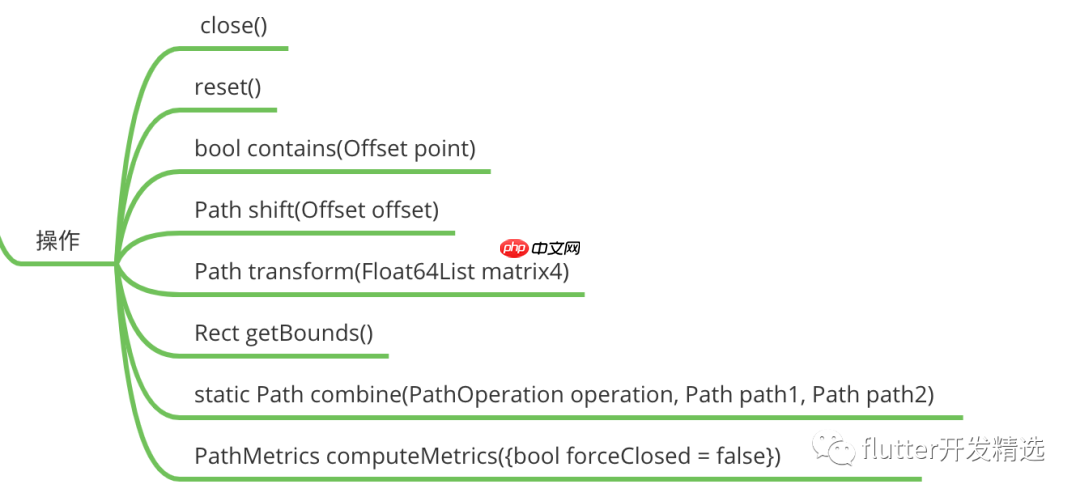
一、路径操作
-
close、reset、shift
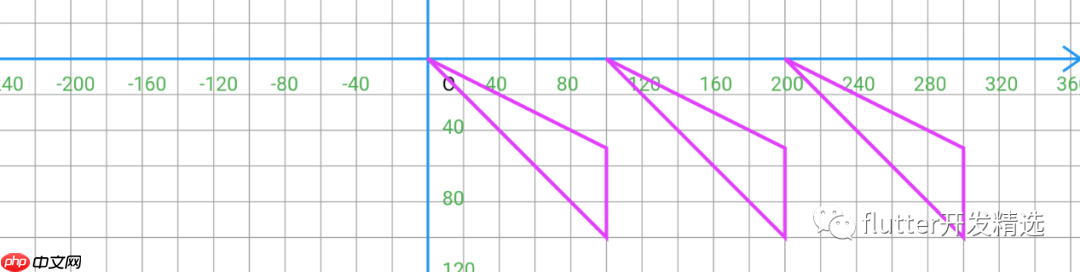
// [p06_path/12_close_reset_shift/paper.dart]
Path path = Path();
Paint paint = Paint()
  ..color = Colors.purpleAccent
  ..strokeWidth = 2
  ..style = PaintingStyle.stroke;
<p>path
..lineTo(100, 100)
..relativeLineTo(0, -50)
..close();</p><p>canvas.drawPath(path, paint);
canvas.drawPath(path.shift(Offset(100, 0)), paint);
canvas.drawPath(path.shift(Offset(200, 0)), paint);
-
contains和getBounds
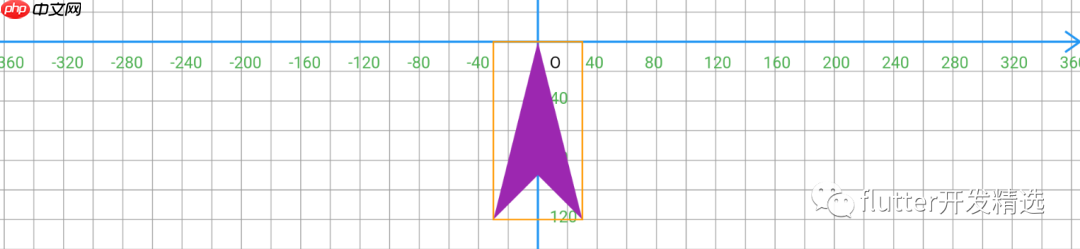
// [p06_path/13_getBounds_contains/paper.dart]
Path path = Path();
Paint paint = Paint()
..color = Colors.purple
..style = PaintingStyle.fill;</p><p>path
..relativeMoveTo(0, 0)
..relativeLineTo(-30, 120)
..relativeLineTo(30, -30)
..relativeLineTo(30, 30)
..close();</p><p>canvas.drawPath(path, paint);
print(path.contains(Offset(20, 20)));
print(path.contains(Offset(0, 20)));</p><p>Rect bounds = path.getBounds();
canvas.drawRect(
bounds,
Paint()
..color = Colors.orange
..style = PaintingStyle.stroke
..strokeWidth = 1
);
-
Path#transform: 路径变换
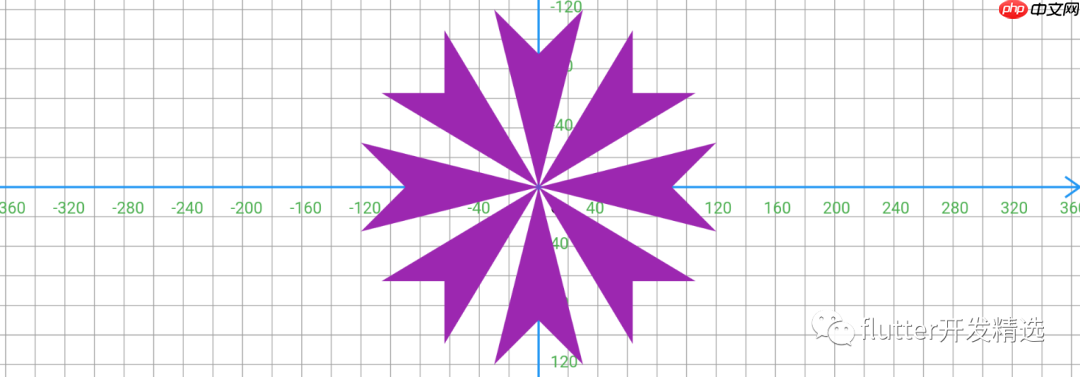
// [p06_path/14_getBounds_contains/paper.dart]
Path path = Path();
Paint paint = Paint()
..color = Colors.purple
..style = PaintingStyle.fill;</p><p>path
..relativeMoveTo(0, 0)
..relativeLineTo(-30, 120)
..relativeLineTo(30, -30)
..relativeLineTo(30, 30)
..close();</p><p>for(int i = 0; i < 4; i++) {
canvas.drawPath(path, paint);
canvas.translate(100, 0);
path = path.transform(Matrix4.rotationZ(0.1 * i).storage);
}-
combine: 路径联合
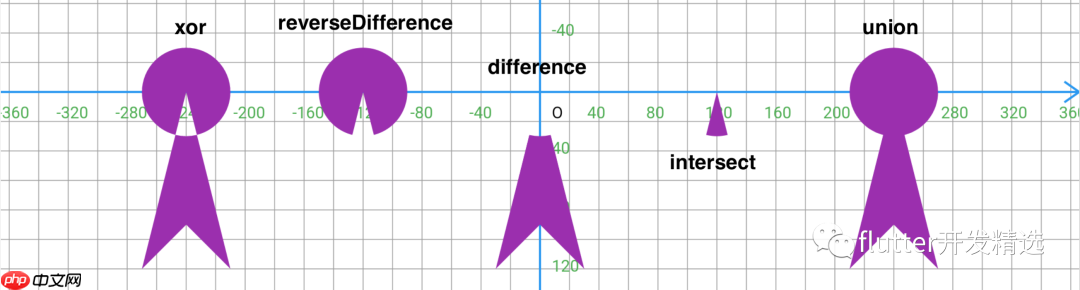
// [p06_path/15_combine/paper.dart]
Path path = Path();
Paint paint = Paint();
paint
..color = Colors.purple
..style = PaintingStyle.fill;</p><p>path
..relativeMoveTo(0, 0)
..relativeLineTo(-30, 120)
..relativeLineTo(30, -30)
..relativeLineTo(30, 30)
..close();</p><p>var pathOval = Path()..addOval(Rect.fromCenter(center: Offset(0, 0), width: 60, height: 60));</p><p>canvas.drawPath(Path.combine(PathOperation.difference, path, pathOval), paint);
canvas.translate(120, 0);
canvas.drawPath(Path.combine(PathOperation.intersect, path, pathOval), paint);
canvas.translate(120, 0);
canvas.drawPath(Path.combine(PathOperation.union, path, pathOval), paint);
canvas.translate(-120*3.0, 0);
canvas.drawPath(Path.combine(PathOperation.reverseDifference, path, pathOval), paint);
canvas.translate(-120, 0);
canvas.drawPath(Path.combine(PathOperation.xor, path, pathOval), paint);
二、路径测量的使用
 用多边形路径制作的SVG孟加拉虎图案特效
一款超酷的适合2025虎年网页使用的多边形路径制作的SVG孟加拉虎图案特效
 31
查看详情
31
查看详情

- 认识
Path#computeMetrics
// [p06_path/16_computeMetrics/paper.dart]
Path path = Path();
path
..relativeMoveTo(0, 0)
..relativeLineTo(-30, 120)
..relativeLineTo(30, -30)
..relativeLineTo(30, 30)
..close();</p><p>path.addOval(Rect.fromCenter(center: Offset.zero, width: 50, height: 50));</p><p>PathMetrics pms = path.computeMetrics();
Tangent t;
pms.forEach((pm) {
print("---length:-${pm.length}----contourIndex:-${pm.contourIndex}----contourIndex:-${pm.isClosed}----");
});</p><p>// [打印日志]
// ---length:-332.2391357421875----contourIndex:-0----contourIndex:-true----
// ---length:-156.0674285888672----contourIndex:-1----contourIndex:-true----- 路径测量获取路径某位置信息
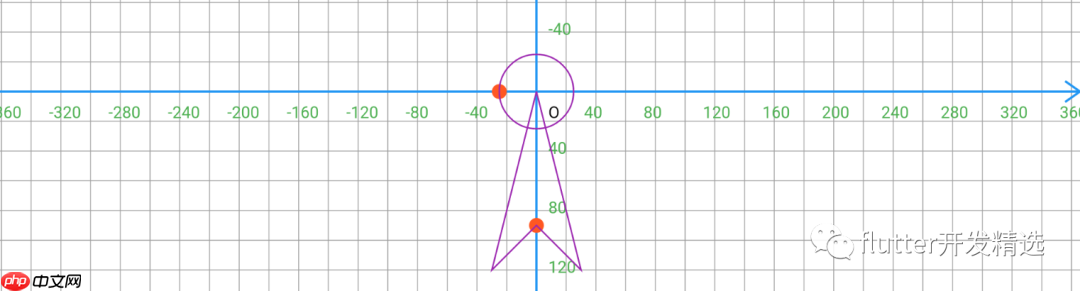
Paint paint = Paint()
..color = Colors.purple
..strokeWidth = 1
..style = PaintingStyle.stroke;</p><p>Path path = Path();
path
..relativeMoveTo(0, 0)
..relativeLineTo(-30, 120)
..relativeLineTo(30, -30)
..relativeLineTo(30, 30)
..close();</p><p>path.addOval(Rect.fromCenter(center: Offset.zero, width: 50, height: 50));</p><p>PathMetrics pms = path.computeMetrics();
pms.forEach((pm) {
Tangent tangent = pm.getTangentForOffset(pm.length * 0.5);
print(
"---position:-${tangent.position}----angle:-${tangent.angle}----vector:-${tangent.vector}----"
);
canvas.drawCircle(
tangent.position, 5, Paint()..color = Colors.deepOrange
);
});</p><p>canvas.drawPath(path, paint);</p><p>// [打印日志]
// ---position:-Offset(0.0, 90.0)----angle:-0.7853981633974483----vector:-Offset(0.7, -0.7)----
// ---position:-Offset(-25.0, 0.0)----angle:-1.5707963267948966----vector:-Offset(0.0, -1.0)----- 路径测量和动画结合
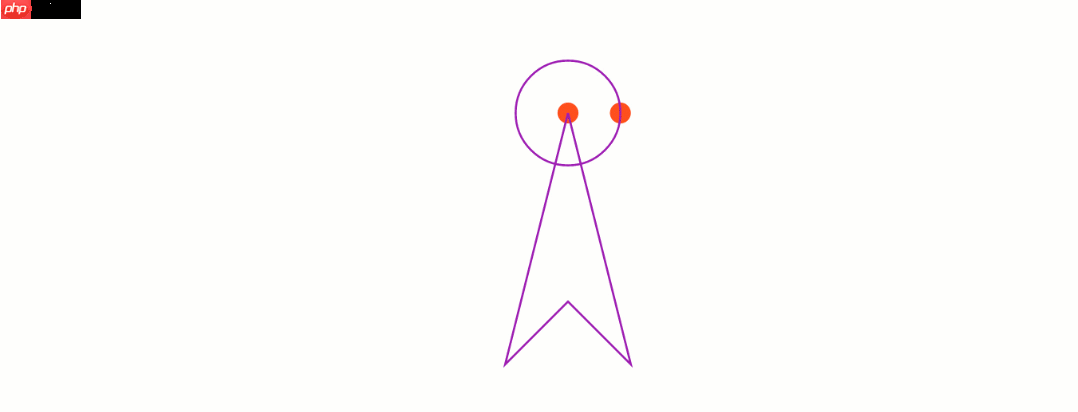
// [p06_path/17_computeMetrics_anim/paper.dart]
class Paper extends StatefulWidget {
@override
_PaperState createState() => _PaperState();
}</p><p>class _PaperState extends State<Paper> with SingleTickerProviderStateMixin {
AnimationController _ctrl;</p><p>@override
void initState() {
super.initState();
_ctrl = AnimationController(duration: Duration(seconds: 3), vsync: this)
..forward();
}</p><p>@override
void dispose() {
_ctrl.dispose();
super.dispose();
}</p><p>@override
Widget build(BuildContext context) {
return Container(
color: Colors.white,
child: CustomPaint(
painter: PaperPainter(progress: _ctrl),
),
);
}
}</p><p>class PaperPainter extends CustomPainter {
final Animation<double> progress;</p><p>PaperPainter({this.progress}) : super(repaint: progress);</p><p>@override
void paint(Canvas canvas, Size size) {
canvas.translate(size.width / 2, size.height / 2);
Paint paint = Paint()
..color = Color s.purple
..strokeWidth = 1
..style = PaintingStyle.stroke;</p><pre class="brush:php;toolbar:false;">Path path = Path();
path
..relativeMoveTo(0, 0)
..relativeLineTo(-30, 120)
..relativeLineTo(30, -30)
..relativeLineTo(30, 30)
..close();
path.addOval(Rect.fromCenter(center: Offset.zero, width: 50, height: 50));
PathMetrics pms = path.computeMetrics();
pms.forEach((pm) {
Tangent tangent = pm.getTangentForOffset(pm.length * progress.value);
canvas.drawCircle(
tangent.position, 5, Paint()..color = Colors.deepOrange
);
});
canvas.drawPath(path, paint);
s.purple
..strokeWidth = 1
..style = PaintingStyle.stroke;</p><pre class="brush:php;toolbar:false;">Path path = Path();
path
..relativeMoveTo(0, 0)
..relativeLineTo(-30, 120)
..relativeLineTo(30, -30)
..relativeLineTo(30, 30)
..close();
path.addOval(Rect.fromCenter(center: Offset.zero, width: 50, height: 50));
PathMetrics pms = path.computeMetrics();
pms.forEach((pm) {
Tangent tangent = pm.getTangentForOffset(pm.length * progress.value);
canvas.drawCircle(
tangent.position, 5, Paint()..color = Colors.deepOrange
);
});
canvas.drawPath(path, paint); s.purple
..strokeWidth = 1
..style = PaintingStyle.stroke;</p><pre class="brush:php;toolbar:false;">Path path = Path();
path
..relativeMoveTo(0, 0)
..relativeLineTo(-30, 120)
..relativeLineTo(30, -30)
..relativeLineTo(30, 30)
..close();
path.addOval(Rect.fromCenter(center: Offset.zero, width: 50, height: 50));
PathMetrics pms = path.computeMetrics();
pms.forEach((pm) {
Tangent tangent = pm.getTangentForOffset(pm.length * progress.value);
canvas.drawCircle(
tangent.position, 5, Paint()..color = Colors.deepOrange
);
});
canvas.drawPath(path, paint);
s.purple
..strokeWidth = 1
..style = PaintingStyle.stroke;</p><pre class="brush:php;toolbar:false;">Path path = Path();
path
..relativeMoveTo(0, 0)
..relativeLineTo(-30, 120)
..relativeLineTo(30, -30)
..relativeLineTo(30, 30)
..close();
path.addOval(Rect.fromCenter(center: Offset.zero, width: 50, height: 50));
PathMetrics pms = path.computeMetrics();
pms.forEach((pm) {
Tangent tangent = pm.getTangentForOffset(pm.length * progress.value);
canvas.drawCircle(
tangent.position, 5, Paint()..color = Colors.deepOrange
);
});
canvas.drawPath(path, paint);}
@override bool shouldRepaint(PaperPainter oldDelegate) => oldDelegate.progress != progress; }
以上就是flutter路径的用法(下)的详细内容,更多请关注其它相关文章!
热门内容推荐






快捷栏目导航







